In hospitals, there are various junk articles in the form of unserviceable medical equipment, furniture and electrical equipment etc. which often lie unattended and are stored in various unoccupied areas of the premises. All junk materials stored in the hospital are not reusable or resalable, so these materials will be stored in the junk. It can be done on the “Scrap Issue” page under the Quality section.
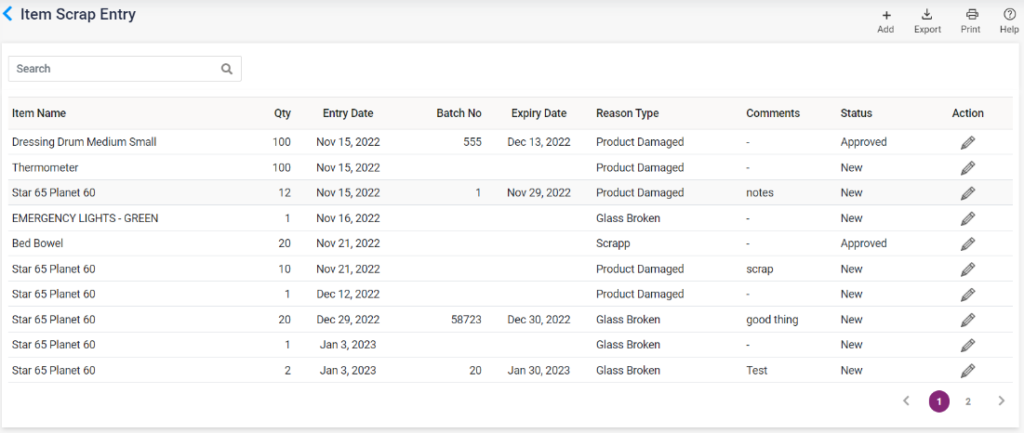
SCRAP ISSUE: The added scrap items will be shown in a list on the scarp issue page. The item name in the search box can search it. To add a certain item in scrap, click on the “Add” button to direct to the “Add Item Scrap” page and enter the following details,
- Warehouse Name: Select the warehouse name from the list. According to the selected warehouse, the items list will be loaded.
- Item Name: Only the items available in the selected warehouse will be loaded. Select the item name from the list.
- Quantity: Enter the Quantity of the item to be disposed of in scrap.
- Scrap Reason Type: Select why the item is being put into scrap.
- The batch no and expiry date of the item will be loaded automatically.
- Comments: Enter comments, if any.
- Save: Select the save button to save the item for scrap entry. Once saved, the entry will be displayed on the Item Scrap Entry page, and that particular item count will be decreased from the stock.
- Cancel and Reset: Click the Cancel button to cancel bill sales. Click on the Reset button to clear the details entered details.
- On edit, the status field will be shown. Accordingly, the user can select the status and update.
13.A.9 – Inventory – Quality Issue- Add Item Scrap page

13.A.10 – Inventory – Quality Issue- Item Scrap List