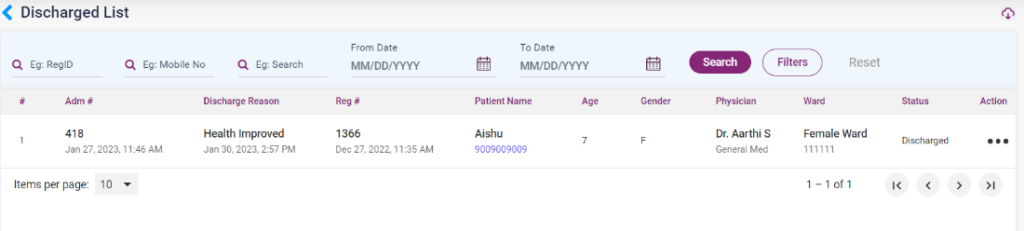
- The discharge list consists of the list of patients who have been discharged after admission and services.
- The discharged patient details can be searched by reg ID, Mobile number, from and to date, search field and discharge reason.
- The details displayed are admission number, discharge reason, registration number, patient name, age, gender, ward, status and action.
- In the action icons, the user can view the following details of the patient,
- View/Edit: The admission summary details of the patient can be viewed from this option.
- Services: By using this option, the user can view the services given to the patient. From that page, use the “Enable to Edit” button to add or edit services.
- Nurse Notes: On selecting this option the user can view the added nurse notes for the patient.
- Doctor Notes: On selecting this option the user can view the added nurse notes for the patient.
- IP Billing: Upon clicking this option, the bill for the IP services done for the patient will be shown in a list with the amount details.
- Discharge Summary: The discharge summary of the patient can be viewed by selecting this option.
6.B.1 – Discharged List